FitCloudPro
- 3.8
- 5M+
- Trusted
ADVERTISEMENT
-
App NameFitCloudPro
-
CategoryHealth & Fitness
-
Developertopstep
-
Developer Emailrd@hetangsmart.com
-
Version2.6.0
-
Download5M+
ADVERTISEMENT
1. App Overview
FitCloudPro App is built for people who want their smartwatch to feel like a helpful companion, not a standalone gadget.
It connects your smartwatch with your mobile phone and helps manage watch functions with clearer control and smoother daily routines.
If you care about tracking progress, staying consistent, and seeing health trends at a glance, this app targets you.
It is also for anyone who likes message reminders and customizable watch faces without complicated setup.
FitCloudPro supports specific Kumi smartwatch models, including KUMI GT6 Pro, KUMI GW16T Pro, KUMI KU3 Max, and KUMI KU3 Meta.
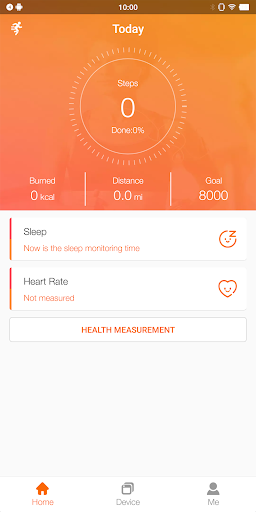
With these models, users can monitor and record daily health data like steps, calories, sleep, heart rate, and blood oxygen.
For fitness goals, the app aims to reduce friction between intention and action, so you can check metrics and reminders quickly.
To get started, many users look for FitCloudPro App Download options and then install FitCloudPro to begin syncing right away.
For those searching for a free FitCloudPro app experience, the app’s value comes from practical features and frequent updates.
Note that FitCloudPro only supports general fitness and wellness purposes, not medical diagnosis or treatment.
After installing, the app requests essential permissions such as location, Bluetooth, contacts, calls, messages, notifications, and background activity.
These permissions help deliver on-time alerts and keep health data in sync, which is a key part of the overall experience.
Users who want dependable notifications often prioritize proper setup and background permissions from day one.
2. Top Features
Health monitoring with rich tracking: FitCloudPro App records steps, calories, sleep, heart rate, and blood oxygen, making it easier to notice patterns.
Real message reminders: The app supports calls and SMS reminders, plus social alerts like Facebook and Twitter, helping you stay responsive.
Custom dials and watch faces: You can choose different watch faces to match your style and mood, adding fun to daily wear.
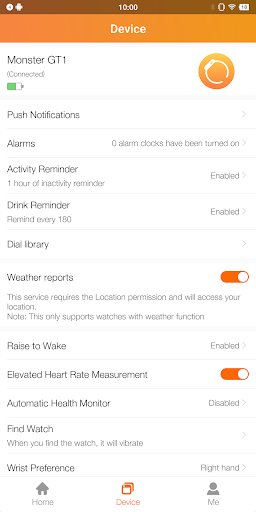
Useful daily-life tools: Sedentary reminders, drinking water prompts, brightness and vibration settings, and do not disturb modes add structure.
These features are the main reason people choose FitCloudPro App for everyday fitness and notification comfort.
Compared to minimal watch companion tools, FitCloudPro free download seekers often find the combination of tracking and reminders most compelling.
If you want to manage your watch’s functions more actively, FitCloudPro App Download helps you access the control center from your phone.
For users deciding whether to install FitCloudPro, the app’s permission model is designed to support timely alerts and synchronized data.
This approach matters because health stats and notifications only work reliably when Bluetooth and background activity are enabled.
Overall, the feature set focuses on daily habits, so your watch becomes more actionable during workouts and rest days alike.
3. Areas for Improvement
Permission complexity: Some users may find the list of permissions, including battery optimization settings and background running, intimidating.
Notification tuning: There is room to improve how users fine-tune reminder categories and vibration behavior for fewer interruptions.
Device-specific consistency: Since it supports particular Kumi models, broader compatibility or clearer guidance for each model would help.
Even though FitCloudPro App aims for strong syncing, new users might need extra time to confirm all settings are correct.
This is one reason people ask for tips while searching for FitCloudPro App Download or a free FitCloudPro app option.
Better onboarding could reduce setup stress and make FitCloudPro free download users feel confident faster.
Clearer in-app explanations would also help users understand why install FitCloudPro requires certain access for on-time notifications.
With refinements in clarity and customization, FitCloudPro App could feel even more polished for first-time owners.
4. User Feedback
Users frequently praise the convenience of tracking without opening multiple screens, especially when trying to monitor steps and sleep.
Many also appreciate message reminders, with positive notes about how call and SMS alerts arrive quickly once permissions are set.
Some review highlights mention that FitCloudPro makes it easier to manage watch functions, rather than relying on limited watch menus.
There are also comments that dials and watch faces help users personalize daily wear, which boosts satisfaction.
However, critical feedback sometimes points to notification delays if background permissions are restricted by the phone.
Some reviewers complain that setup steps are easy to miss, making the experience worse until they adjust settings.
A few users say that the app feels less flexible than expected for notification preferences and vibration intensity.
Still, overall sentiment is often improved after the user completes setup and verifies Bluetooth connection stability.
When people share their experiences online, searches like FitCloudPro App Download and FitCloudPro free download commonly appear in their comments.
That suggests many users evaluate FitCloudPro before install FitCloudPro, and they want reassurance about real-world performance.
In general, positive reviews emphasize practical tracking and reminders, while negative feedback focuses on onboarding and tuning.
5. Overall Evaluation
FitCloudPro App stands out by combining health monitoring and message reminders in one companion experience for supported Kumi smartwatches.
It can be a strong choice for daily fitness goals, especially if you want steps, sleep, heart rate, and blood oxygen visibility.
The ability to get calls, SMS, and social reminders plus customizable watch faces makes it more engaging day to day.
For anyone seeking a free FitCloudPro app experience, the app’s practical features often justify the effort of initial setup.
That said, it would benefit from smoother onboarding and clearer guidance on permissions like battery optimization and background activity.
If you are ready to try it, start by finding FitCloudPro App Download sources and then install FitCloudPro on your phone.
During setup, carefully enable Bluetooth, notifications, and background permissions to ensure on-time alerts and synced health data.
After that, pair your Kumi smartwatch model and review the reminder and dial options to match your preferences.
For general fitness and wellness tracking, FitCloudPro is a reasonable, balanced option with a feature set that fits everyday life.
Just remember it is not for medical purposes, and it should be used for general wellness insights rather than diagnosis.
Many users who complete setup successfully report that FitCloudPro free download routes lead to a satisfying daily workflow.
FitCloudPro
- 3.8
- 5M+
- Trusted
Install Latest APK